servicenow-safety-app
Safety Issue Tracking: A Scoped ServiceNow Application
A custom scoped application built in ServiceNow App Engine Studio, demonstrating table design, a role-based security model with row-level and field-level access control, and form and list configuration.
| Built: 2026-08-06 | Packaged: 2026-08-11 | Version: 1.0.0 |
Scope: x_2190973_safety |
Platform: ServiceNow Zurich, Personal Developer Instance |
Open the access control simulator, a browser-based model of the seven rules described below. No instance, no sign-in.
Scope of this work, stated plainly
This is self-directed laboratory work built in a Personal Developer Instance, not a production deployment and not client work. It is one artifact from ongoing study toward the Certified System Administrator credential, alongside ServiceNow University coursework. It is not evidence of production administration experience and is not presented as such.
Where this README describes a design decision, the decision was mine and I can explain the alternatives I rejected; where it describes a limitation, the limitation is real and I have not papered over it. A portfolio that overstates its own scope is worth less than one that does not.
What the application does
Safety Issue tracking. A user reports a safety issue, the issue is assigned to someone, and a manager can attach notes that the reporting user cannot see. The functional surface is deliberately small. The interesting work is in the security model underneath it.
What it demonstrates
| Competency | Where to look |
|---|---|
| Scoped application design | x_2190973_safety namespace, application menu, modules |
| Custom table creation | x_2190973_safety_safety_issue |
| Field design including reference fields | assigned_to (reference to sys_user), manager_notes |
| Role definition | x_2190973_safety.user, x_2190973_safety.admin |
| Per-operation access control | 7 ACLs covering create, read, write, delete |
| Row-level security | Dynamic condition restricting users to their own records |
| Field-level access control | manager_notes readable only by the admin role |
| Form and list configuration | Form layout and list layout records |
| Application packaging | Published to a named, exportable update set |
The security model
This is the part I would want to be asked about.
The application defines two roles. x_2190973_safety.user is the ordinary
participant. x_2190973_safety.admin is the manager. Seven access controls
distribute permissions between them.
Access controls, as built
| # | Operation | Target | Granted to | Condition |
|---|---|---|---|---|
| 1 | create | table | user and admin | none |
| 2 | read | table | user | assigned to the current user |
| 3 | read | table | admin | none |
| 4 | write | table | user | assigned to the current user |
| 5 | write | table | admin | none |
| 6 | delete | table | admin | none |
| 7 | read | manager_notes field |
admin | none |
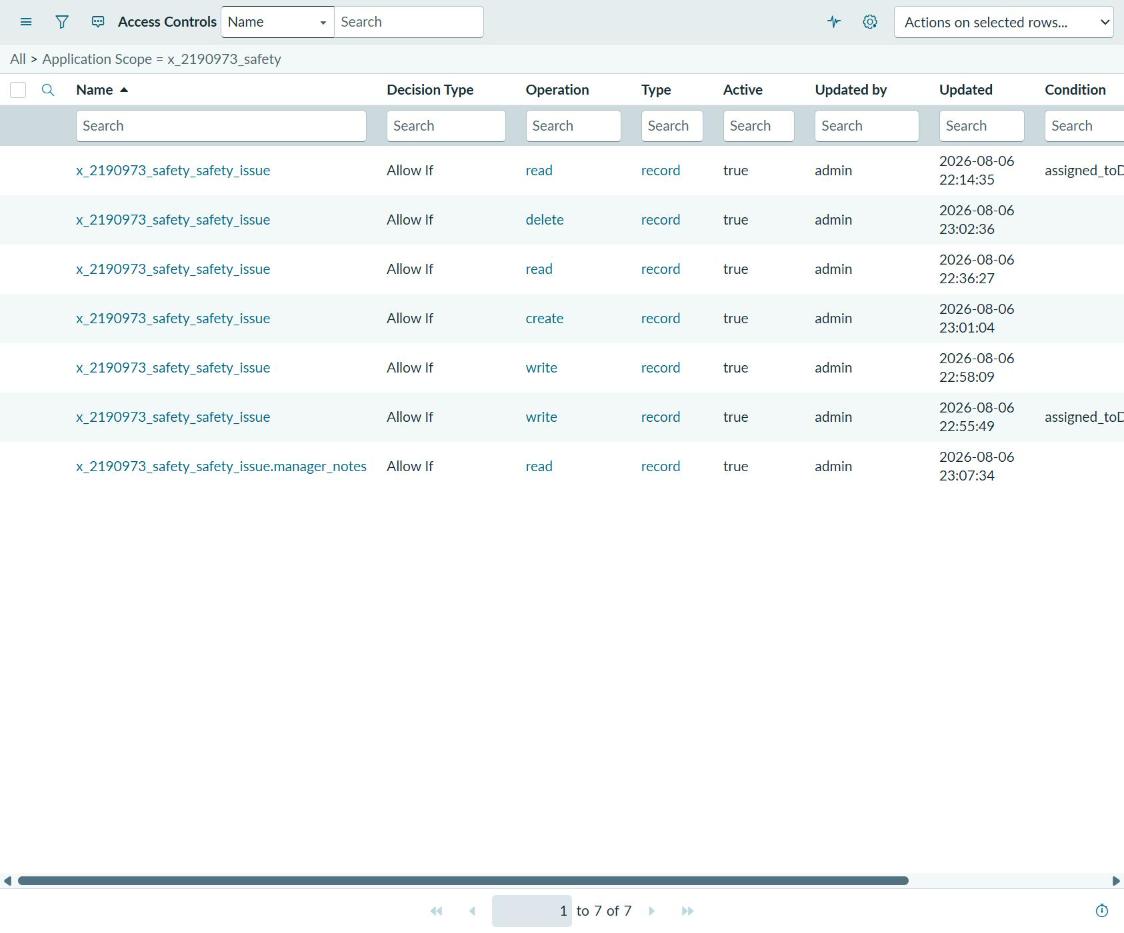
Two rows carry a condition restricting rows to the current user. The seventh row is the
field-level rule on manager_notes.
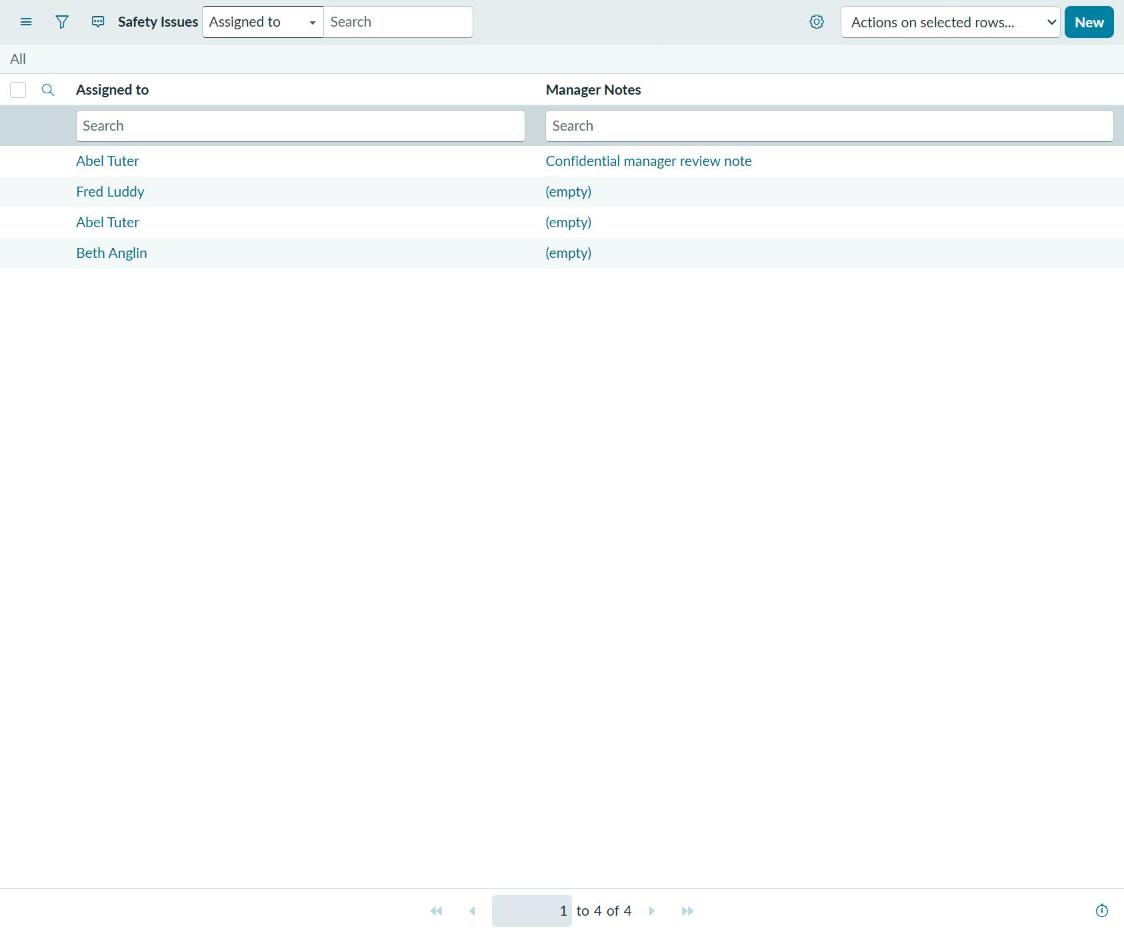
The same list, as two different roles.
| As administrator | As x_2190973_safety.user |
|---|---|
 |
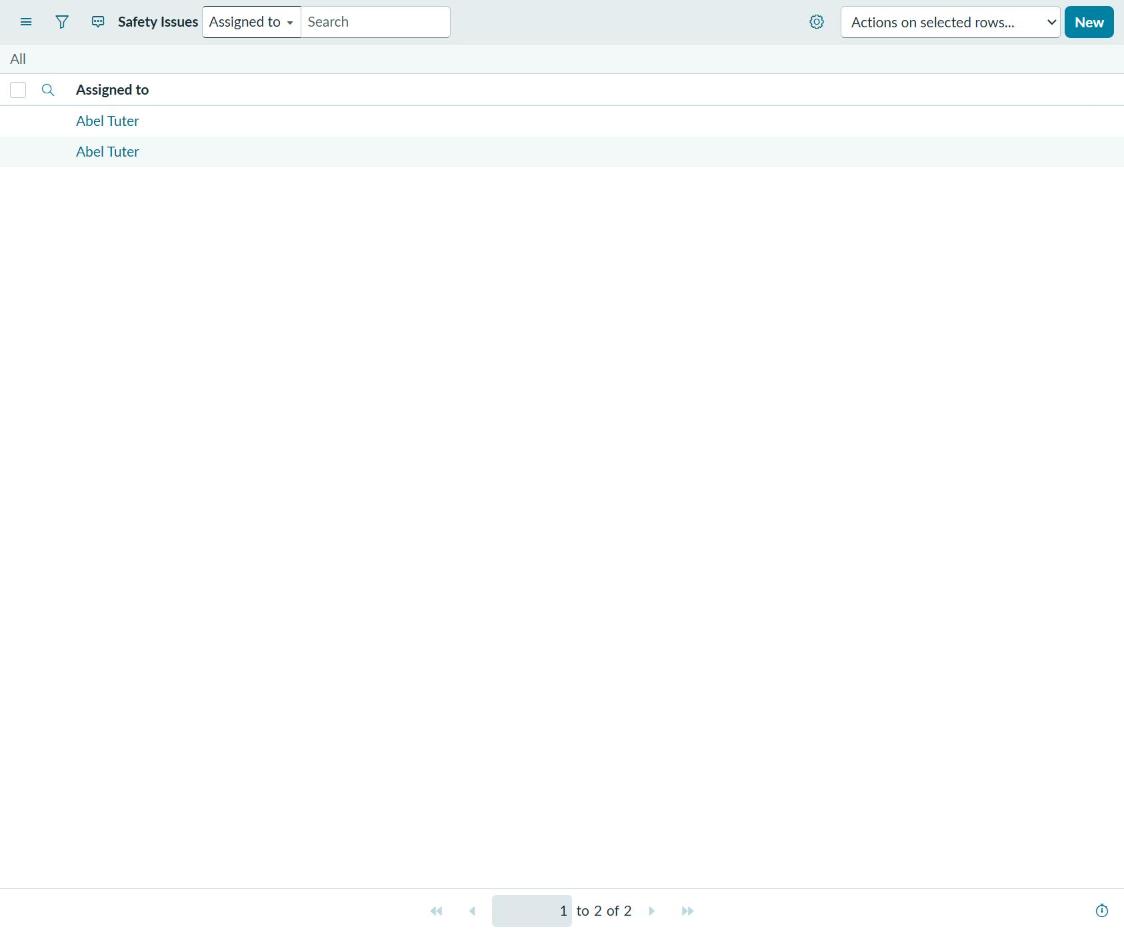 |
Left: signed in as administrator, all four records, Manager Notes visible. Right: the
identical list while impersonating a demo user holding only x_2190973_safety.user. Two
records instead of four, and the Manager Notes column is not merely blank, it is not
present. That is rules 2, 4, and 7 running, not asserted.
Try it interactively. A client-side simulator of these same seven rules, running as JavaScript in your browser with no ServiceNow platform behind it. Switch between four roles, including a platform administrator, and watch which rule grants or denies each operation, field access included. It reimplements the access controls for demonstration; the update set XML below remains the authoritative artifact.
Why it is built this way
Each operation gets its own rule. Create, read, write, and delete are four distinct operations in ServiceNow’s access control model, and a requirement like “users may see this but only managers may change it” cannot be expressed in a single rule. Rules 2 and 4 versus rules 3 and 5 are that requirement made concrete.
Row-level security comes from a condition, not a script. Rules 2 and 4 carry a
dynamic condition evaluating assigned_to against the current user. An ordinary
user therefore sees and edits only the issues assigned to them, while an
administrator sees everything. This is a declarative condition rather than a
scripted ACL, which is the right default: it is readable by someone who does not
write JavaScript, and it survives upgrades without review.
Field-level control requires table-level control first. Rule 7 restricts the
manager_notes field to administrators. This rule is only meaningful because rules
2 and 3 already grant table-level read access. ServiceNow evaluates table-level
access controls before field-level ones, so a permissive field rule sitting behind
a table that grants nothing would never be reached. Getting this ordering wrong is
the single most common access-control mistake I have seen described, and rule 7 is
where I proved to myself that I understood it.
One rule was created and then deleted. The update history shows a field-level access control that I built and then removed. That was not tidying. It was the result of testing the evaluation order above and finding that the rule I had first written was not doing what I assumed. The deletion is the honest record of that, and I would rather leave it visible than clean it out of the history.
Repository contents
.
├── README.md                          You are here
├── LICENSE                            MIT
├── CITATION.cff                       How to cite this application
├── .github/
│   └── workflows/
│       ├── acl-audit.yml              Re-audits the packaged access controls
│       └── doc-drift.yml              Re-checks this README against the repository
├── demo/
│   └── index.html                     Interactive access control simulator
├── docs/
│   ├── DESIGN_RATIONALE.md            Decisions made and alternatives rejected
│   └── SCREENSHOT_GUIDE.md            What to capture and how to redact it
├── screenshots/                       Referenced from this README
│   ├── 04-access-controls-list.png
│   ├── 07-list-as-admin.png
│   └── 08-list-as-user.png
├── tools/
│   ├── acl_audit.py                   Checker behind the ACL audit workflow
│   └── doc_drift.py                   Checker behind the documentation drift workflow
└── update-set/
    └── Safety_v1.0.0_update_set.xml   Complete, importable application
- Design rationale: every decision made, the alternatives considered, and where the argument cuts against me.
- Screenshot guide: the shot list and redaction rules used to produce the screenshots below.
- Update set XML: the complete, importable application.
Two scheduled checks run against this repository rather than against an instance. One re-parses the packaged update set and re-audits the seven access controls. The other compares the file tree and the links in this README against what is actually committed, so a claim in this file cannot quietly outlive the file it describes.
Installing this application
The update set XML is a complete package: table, fields, roles, access controls, form and list layouts, application menu and modules, plus four sample records.
- In a target instance, go to Retrieved Update Sets.
- Choose Import Update Set from XML and upload
update-set/Safety_v1.0.0_update_set.xml. - Open the retrieved set and Preview it. Resolve any collisions.
- Commit the update set.
- Grant a test user
x_2190973_safety.userand impersonate them to see the row-level and field-level rules take effect.
Step 5 is the one worth doing. The security model is invisible as an administrator, because administrators bypass it.
Verification
The packaged update set contains 36 configuration records:
| Type | Count |
|---|---|
| Access Roles | 10 |
| Access Control | 7 |
| Field Label | 3 |
| Dictionary | 3 |
| Application Menu | 2 |
| Role | 2 |
| Module | 2 |
| Embedded Help Role Priority | 2 |
| Table | 1 |
| Custom Application | 1 |
| Form Layout | 1 |
| List Layout | 1 |
| Table Subscription Configuration | 1 |
The XML parses cleanly and contains no instance URL, credential, or personal data.
Honest limitations
- No flow automation. There is no Flow Designer flow. Issues are assigned manually. Approval routing would be the natural next addition.
- No business rules or client scripts. All behavior is declarative. That is a defensible choice for an application this size, but it means this repository does not demonstrate server-side or client-side scripting.
- No integration. Nothing here calls or is called by an external system.
- The table is standalone. See the design rationale for why, and for the argument against that choice.
- Four sample records. Enough to demonstrate the access rules, not enough to demonstrate anything about scale.
- Built in a single working session. The timestamps say so and I am not going to pretend otherwise.
License
MIT. See LICENSE. The update set is yours to import, inspect, and modify.